Before we start developing anything for our solution for learning another language, we need to determine our model.
To refresh ourselves on our requirement:
Solution that will connect learners and experienced speakers of a language, considering levels of skill and preferred communication methods to facilitate time-bound meetings which must be paid for by the learner.
Define our Entities
From this we can establish our main entities (what we’ll be working with):
- Learner
- Mentor
- Skill
- Communication method
- Payment
- Appointments
Some of these are people, data or more abstract concepts.
People
Our people are:
- Learner
- Mentor
But these people may be the same person. (A mentor may also be a learner) We can simplify these people into:
- Person
We’ve forgotten someone. What about the person who will manage the process, the administrator? Who will also be a Person. Therefore, it’s not the Person that’s important, it’s who they are and what they can do. So, a Person can be:
- a learner
- a mentor
- an administrator
Data
We’ve established what a Person is, who will become a fundamental aspect of our data.
We also need to store:
- Communication method
- Skill
- Payment
- Appointments
Communication method and Skill will be simple. A Communication method could be “Teams” or “Google Hangouts” and Skill can be a range of discrete skills, from “beginner” to “experienced”. These will map well to choices or lookup lists in Power Platform.
Payment and Appointments would be more complex. A Payment will have additional data associated with it such as amount, date, method, etc. Appointments will have time, length, etc. These will be complex objects in Power Platform.
Concepts
More abstract elements should be considered when defining the model. Appointments are fundamentally bound to time, for example. These concepts can be translated into business rules, for example:
- An Appointment must be paid for (Payment)
- A Payment is made by a Learner
- Appointments are time-bound and are recurrent based on how many sessions have been purchased.
Our model is starting to take shape.
Model
In defining our model, we now know:
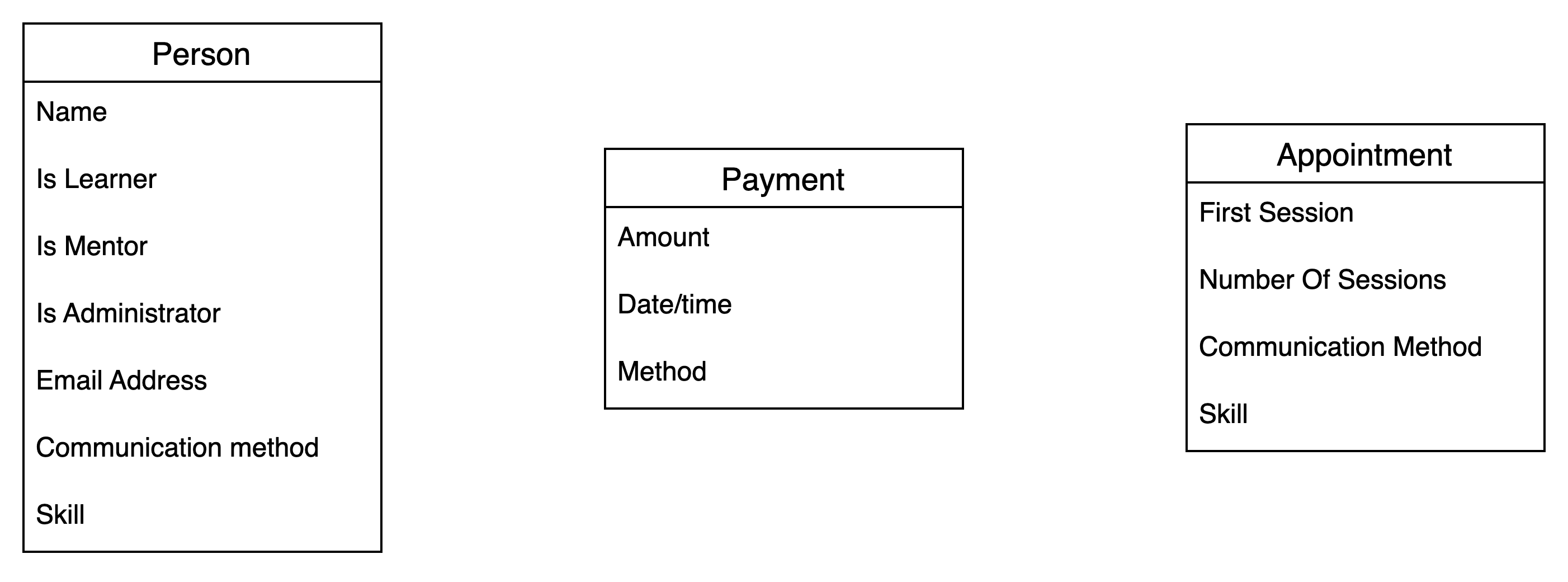
- A Person can be a Learner, Mentor or Administrator or any combination.
- A Learner and Mentor can have communication method preferences and differing levels of skill.
- A Person will have name and contact details.
- In order to book Appointments, Payment must be made.
- Payments will have data such as amount, date of payment, method, etc.
- The Administrator oversees the matching of a Learner with a Mentor, which activates the Appointments.
- Appointments will have start times, expiration and number of sessions
We can start building out our Entity Relationship Diagram:
There are relationships between the entities:
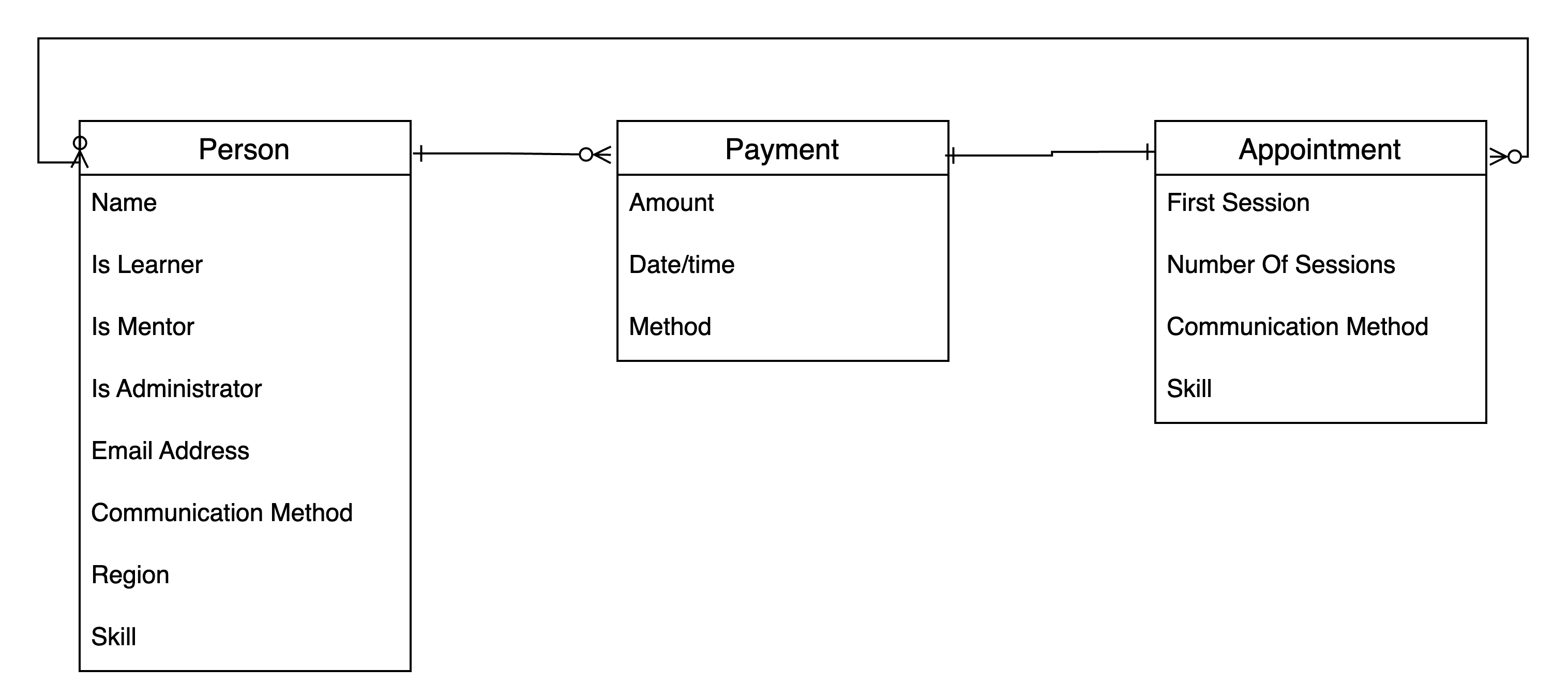
We’ve started to add relationships using “crow’s feet“. We haven’t established primary keys, etc. yet.
Implement in Dataverse
This model is ready for implementation in Dataverse.
Some points to notice:
- Field names are written in Title Case, when Dataverse derives its schema name, it will squash out the spaces. Using Title Case retains the meaning, so “Email Address” will become “EmailAddress”.
- We’re going to change Communication Method and Region from being a simple choice field to being their own entity because it gives us more flexibility when we’re designing the Model-Driven App and for configuration opportunities in the future. This will change our model slightly:
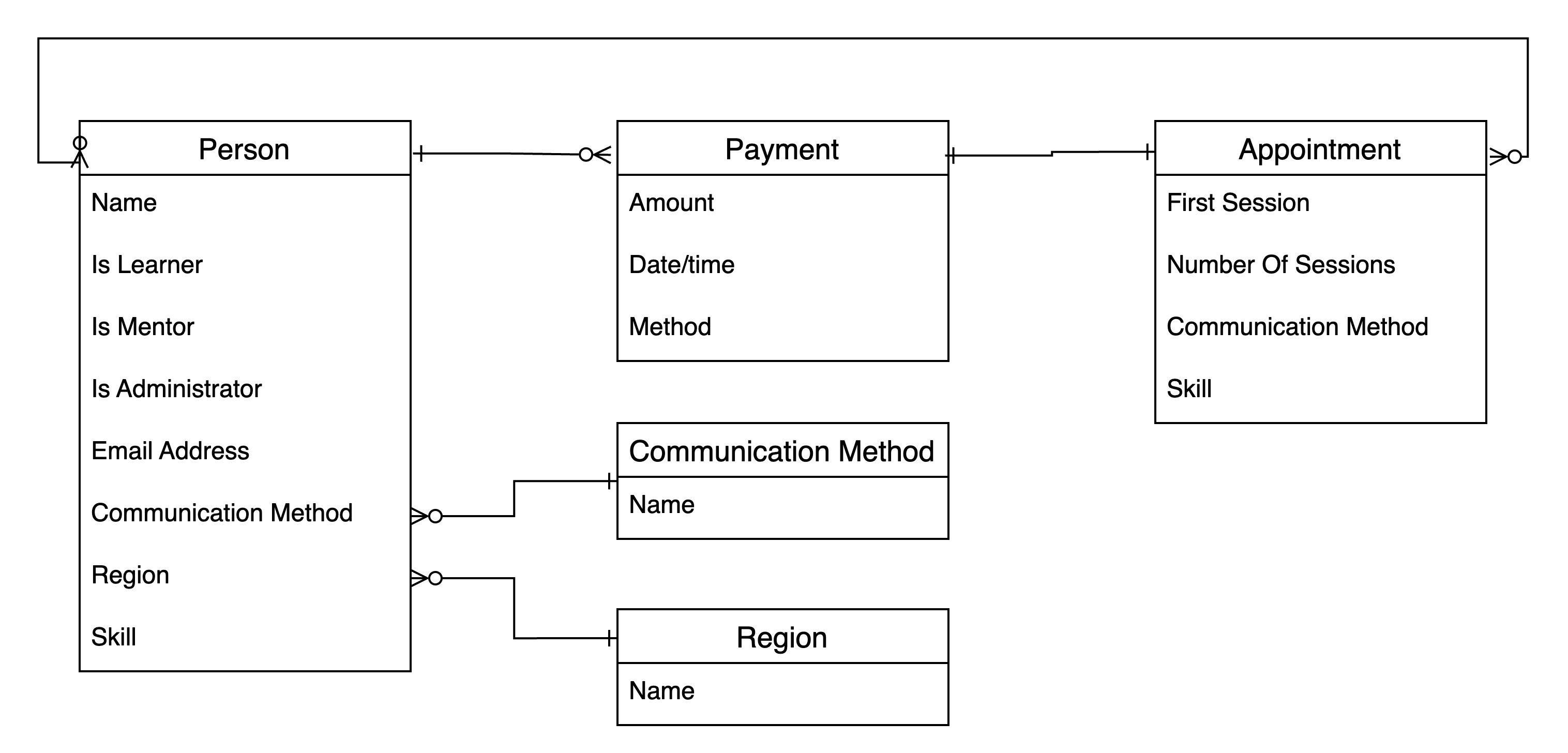
Creating the Communication Method
The Communication Method is how the Appointments will be held. People have their own preferences for remote conferencing technologies, or would prefer in-person contact.
The Table should be created as a Standard Table, with the settings:
| Table name | Communication Method |
| Plural name | Communication Methods |
Our principle columns should be:
| Column name | Type | Notes |
| Name | Text | Name of the Communication Method. |
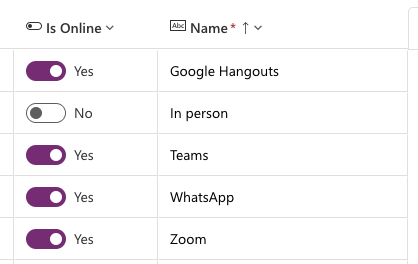
| Is Online | Yes/No | Allows identification of whether the medium is online or not. This allows us to report on person-person preferences. |
Typical data would be:
Creating the Region
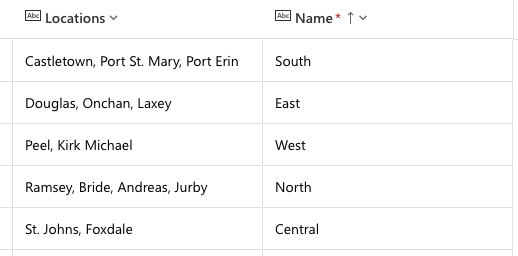
The Region is a region of towns within a geographical area. On the Isle of Man, this would be North, South, East, West and Central. Within each Region are a group of larger towns which can help people decide which best matches their region.
The Table should be created as a Standard Table, with the settings:
| Table name | Region |
| Plural name | Regions |
Our principle columns should be:
| Column name | Type | Notes |
| Name | Text | Name of the Region |
| Locations | Text | Provides opportunity to add additional detail to the Region, such as towns within the Region. |
Typical data for the Isle of Man would be:
Creating the Person
The Person gives us details about the Person, whichever role they have (Learner, Mentor or Administrator).
It also shows how we can configure plurals in Dataverse so that the collective noun for Person becomes People. When creating the entity, be sure to make sure that the correct column will be the Primary Name column.
When creating the Person entity, consider creating the fields before saving the entity. This is because the editor will select the Primary Name column from the created fields. If the fields have been created as you require, this will not be a problem. It is not possible to change the Primary name field after the table is created. The Primary name column does not need to be unique (so you can have two First Name fields “John”). Its use should perhaps be regarded as being first-amongst-equals. There is an additional Unique Identifier created as part of each entity which is used to identify each record.

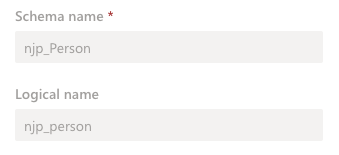
Unfortunately, this pluralisation is only surface deep. The underlying schema and logical names are still “Person”, so we need to consider that when referencing them:
When the entity is created, it should be created as a Standard table.
Dataverse adds a number of extra columns but the ones we need now are in the table below.
| Column name | Type | Notes |
| First Name | Text | |
| Last Name | Text | |
| Full Name | Formula | Used to concatenate the First Name with the Last Name using PowerFX.Concatenate('First Name'," ",'Last Name') |
| Email Address | ||
| Preferred Region | Lookup | Lookup to Region entity. |
| Preferred Communication Method | Lookup | Lookup to Communication Method entity. |
| Other Communication Method | Lookup | Lookup to Communication Method entity. Allows a Person to choose another Communication Method in case the first can’t be matched. |
| Skill Level | Whole number | We’ll need to establish a business rule that enforces a range between 1 and 5 and that 1 is least, 5 is most skilled. |
Relationships
Dataverse identifies each entity row using a GUID, adding a field to each entity accordingly. In our example, they are:
| Entity | Name of Unique Identifier column |
| Communication Method | Communication Method |
| Region | Region |
| Person | Person |
The name doesn’t matter, just so we know that they are there. They are particularly useful in Flows.
The problem is that Dataverse has a second identifier field (the “Primary name column”), which is applied to entities as part of their creation. This leaves us with:
Dataverse identifies each entity row using a GUID, adding a field to each entity accordingly. In our example, they are:
| Entity | Name of Unique Identifier column | Primary name column |
| Communication Method | Communication Method | Name |
| Region | Region | Name |
| Person | Person | First Name (assuming the table has been correctly set up) |
Now we have our Dataverse and relationships initially configured, we can start building the Model-driven-app.
More in this series
As I go through this, there are more posts which I’ve created.
 Live to work
Leave a comment