
If we start with the Model-Driven-app that the administrator will use, we can establish relationships, rules and entities from the outset.
To refresh ourselves on our requirement:
Solution that will connect learners and experienced speakers of a language, considering levels of skill and preferred communication methods to facilitate time-bound meetings which must be paid for by the learner.
Creation of the Model-Driven-App
From the Solution (because we always create things in Solutions), use the command bar to select New > App > Model-driven app and populate the basic form:

After clicking Create a new app will be created.
Configure the navigation
We’ll first configure the navigation to separate the core data (People, Appointments, etc.) from the static data that is used for configuration (Regions, Communication methods, etc.)
On the left under “Navigation”, select the ellipsis (“…”) and click New group:
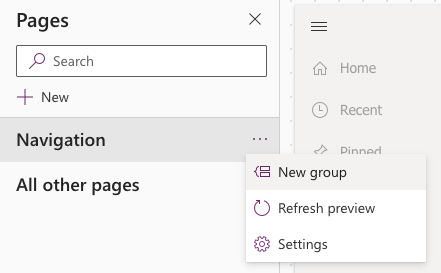
Create two groups, one for “Main”, one for “Settings”. Each group is renamed in the right-hand properties palette.
Create the first page
Model-driven apps operate using Pages. A Page can be one of:
- Dataverse table: The page is either a list/grid of entities (a “View”) or an individual entity (a “Form”)
- Dashboard: providing opportunity to create reports
- Web resource: provides a “window” to an internet page
- Navigation link: provides a link to an internet page
- Custom page: requiring additional configuration to provide an even more customised experience
In order to create one to manage Regions, click on the ellipsis (…) to the right of the “Settings” group and select New page.
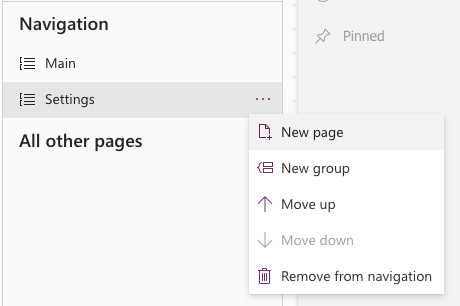
Choose “Dataverse table” when prompts and choose “Region”. Ensure “Show in navigation” is checked.
The Page will look something like the below, which already contains data.

This can be repeated for Communication Methods.
Notice in the navigation on the left that there is a distinction between the View and the Form.

Both may be edited in the designer.
If there isn’t any data in these entities, ensure there is before continuing.
More in this series
As I go through this, there are more posts which I’ve created.

 Live to work
Leave a comment